FLEX 1616-5092-010C-6252 Flexradio Maestro Control Console
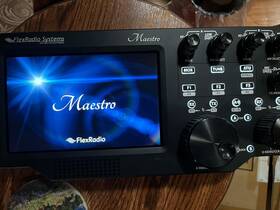
( Brand: Flex ), ( Manufacturer Part Number: 1616-5092-010C-6252 ), ( Model: MAESTRO ), ( Type: Ham Radio Transceiver ), ( Unit Type: Unit ), ( Manufacturer Warranty: No ), ( Color: Black ), ( Compatiblebrand: Universal ), ( Country Of Origin: United States )
Review FLEX Flexradio Maestro Control Console Ver
The **FlexRadio Systems Maestro Control Console (Model 1616-5092-010C-6252)** is a sophisticated, all-in-one control hub designed to elevate the experience of radio enthusiasts, amateur operators, and professional communicators by seamlessly integrating with FlexRadio s lineup of high-performance transceivers, including the PowerSDR-compatible series. Engineered with precision and built for both desktop and rack-mount applications, the Maestro serves as a central command center, consolidating the controls, monitoring, and connectivity functions of a FlexRadio system into a compact yet feature-rich interface. Its sleek, modern design combines ergonomic layout with robust construction, featuring a high-resolution, full-color touchscreen display that provides intuitive navigation through menus, settings, and real-time signal analysis. The console s touch-sensitive interface, complemented by tactile buttons and knobs, ensures smooth operation whether you re adjusting bandwidth, tuning frequencies, or managing digital modes like FT8, JT65, or PSK31 with ease. At its core, the Maestro enhances flexibility and workflow efficiency by offering direct control over key functions such as antenna switching, filter selection, and signal processing, all while maintaining a clean, uncluttered workspace. Ideal for both home stations and competitive contesting setups, this console supports multiple transceivers simultaneously, allowing operators to manage multiple bands or modes from a single interface perfect for those who demand versatility without sacrificing performance. Whether used as a standalone unit or paired with a FlexRadio transceiver like the SDR-1400 or SDR-1000, the Maestro transforms the operating experience by providing instant access to advanced features such as waterfall displays, spectrum analysis, and integrated logging tools, all while ensuring seamless compatibility with PowerSDR software for full customization. Built with durability in mind, the Maestro s robust construction and high-quality components ensure long-term reliability, making it a valuable investment for both casual listeners and dedicated radio operators who seek a refined, all-in-one solution for their communication needs.
### Pros and Cons of buying a FlexRadio Maestro Control Console (Flex 1616-5092-010c-6252)
#### **Pros**
1. **Enhanced Control and Flexibility**
The Maestro is a dedicated control console designed specifically for FlexRadio transceivers, including the Panadapter and Spectrum Scope. It provides a physical interface for adjusting key functions like tuning, filtering, and signal analysis, which can be more intuitive and efficient than relying solely on a computer or touchscreen.
2. **Improved Workflow for DXing and Contesting**
For operators engaged in DXing, contesting, or other forms of competitive radio operation, the Maestro s dedicated knobs and buttons allow for quick adjustments without the need to navigate menus or use a mouse. This can significantly reduce reaction time, which is critical in fast-paced operating scenarios.
3. **Better Integration with FlexRadio Transceivers**
The Maestro is designed to work seamlessly with FlexRadio hardware, such as the Flex-6000 series or Flex-5000 series transceivers. It leverages the same software ecosystem (e.g., SmartSDR) and provides a hardware interface that enhances the overall user experience. Features like direct tuning, filter selection, and signal monitoring are all physically accessible.
4. **Reduced Strain on Computer Hardware**
By offloading some control functions to the Maestro, the primary computer used with SmartSDR can focus on running the software without being bogged down by constant hardware interactions. This can lead to smoother performance, especially in demanding operating conditions.
5. **Portability and Ergonomics**
The Maestro is compact and can be mounted on a desk or integrated into a shack setup. Its design prioritizes ergonomics, with well-placed controls that reduce the need for excessive mouse or keyboard use. This can be particularly beneficial for operators who spend long hours at the radio.
6. **Compatibility with SmartSDR**
Since the Maestro is built for SmartSDR, it integrates seamlessly with the software s features, such as virtual knobs, filters, and signal processing tools. This compatibility ensures that all functions are synchronized between the hardware and software, providing a cohesive operating experience.
7. **Future-Proofing**
FlexRadio regularly updates its software and hardware, and the Maestro is designed to support future iterations of SmartSDR. This means that as new features are added to the software, the Maestro can continue to provide physical access to those functions without requiring additional hardware purchases.
---
#### **Cons**
1. **Additional Cost**
The Maestro is not a cheap accessory, and it adds to the overall investment required to set up a FlexRadio station. For operators who are already using a computer or touchscreen interface, the cost-benefit ratio may not justify the purchase unless they frequently rely on physical controls.
2. **Learning Curve**
While the Maestro simplifies certain operations, it may require some time to get used to its layout and functions, especially for operators who are accustomed to traditional control panels or other software interfaces. The transition from a mouse/keyboard setup to dedicated knobs and buttons can take adjustment.
3. **Limited Use Outside FlexRadio Ecosystem**
The Maestro is specifically designed for FlexRadio transceivers and SmartSDR. If an operator uses other software (e.g., WSJT-X, HRD, or third-party applications), the Maestro s utility is significantly reduced. It cannot be used with non-FlexRadio hardware or software without limitations.
4. **Space and Cable Management**
The Maestro requires additional space on the operating desk and may introduce more cables or connections to manage. This can clutter the shack if not organized properly, which may be a concern for operators with limited desk space.
5. **Dependence on SmartSDR**
The Maestro s functionality is entirely dependent on SmartSDR running on a connected computer. If the computer crashes, the software freezes, or there are network issues, the Maestro s controls may become ineffective until the underlying system is restored. This introduces a single point of failure that could disrupt operations.
6. **Potential for Overkill**
For casual operators or those who primarily use their transceivers for simple communication (e.g., local contacts, emergency use), the Maestro may offer more features than necessary. In such cases, a basic keyboard, mouse, or even a touchscreen interface might suffice without the added complexity.
7. **Maintenance and Durability Concerns**
Like any electronic device, the Maestro is subject to wear and tear. Over time, knobs may wear out, buttons may become unresponsive, or internal components could fail. While FlexRadio products are generally reliable, this is a consideration for operators who prioritize long-term durability and low maintenance.
---
### **Conclusion**
The FlexRadio Maestro Control Console is a powerful tool for operators who prioritize efficiency, ergonomics, and seamless integration with FlexRadio transceivers. Its dedicated controls enhance the operating experience, particularly in competitive or demanding scenarios like DXing and contesting. However, it is not a necessity for every operator and may not justify its cost for those who rely on alternative software or have simpler operating needs.
The decision to purchase the Maestro should be based on your specific operating style, budget, and how much you value physical controls over software-based interfaces. If you frequently use FlexRadio hardware and benefit from quick, hands-on adjustments, the Maestro can significantly improve your workflow. Conversely, if you are primarily a casual operator or use other software, the investment may not be worthwhile.
### **Recommendation**
- **Buy the Maestro if:**- You are an active DXer, contester, or operator who values quick, physical control over their FlexRadio transceiver.
- You frequently use SmartSDR and want to reduce reliance on a computer for critical functions.
- You have the budget and desk space to accommodate the additional hardware without clutter.
- You prioritize ergonomics and find that dedicated knobs and buttons improve your operating efficiency.
- **Avoid the Maestro if:**- You primarily use your transceiver for casual communication or local contacts.
- You rely on third-party software (e.g., WSJT-X, HRD) that does not integrate well with the Maestro.
- You are on a tight budget and can achieve similar functionality with a keyboard, mouse, or touchscreen.
- You prefer a minimalist setup and do not see the need for additional hardware controls.
For most serious FlexRadio users who operate frequently and benefit from physical controls, the Maestro is a worthwhile investment. However, it is not a universal solution, and its value depends heavily on individual operating habits and priorities.
Details:
Mint condition what I think is series A Flex Maestro. Includes original box and stand. Free shipping.
part #: 16165092010c6252 price
- $695.00
specifications hamamateuradio:
- brand: Flex
- mpn: 1616-5092-010c-6252
- model: Maestro
- type: Ham Radio Transceiver
- unit type: Unit
- manufacturer warranty: No
- color: Black
- compatiblebrand: Universal
- country of origin: United States
seller hamamateuradio:
- rating: 100.0%
- # reviews: 4208
- city: Los Gatos, California
payments hamamateuradio:
- other
- credit card: Discover
- wallet: Apple-pay
shipping hamamateuradio:
- class: Economy
- service: UPS Ground Saver
- carrier: UPS
- transit: 5-10 Days
- cost: $0.00
- type: Fixed
general hamamateuradio:
- Radio Communication > Ham, Amateur Radio > Ham Radio Transceivers
- condition: Used
offer hamamateuradio:
- options: Ship-to-home
- quantity: 1
- availability: In Stock
- started: May 17, 2026
- sold: 0
returns hamamateuradio:
- policy: No Returns
Flex 1616-5092-010C-6252 Is Similar To:
- Flex-6300-atu Flexradio Systems With Antenna Tuning Unit And Dust Cover (35.6% similar) Providing dual pan adapters and waterfall displays, as well two full-performance slice receivers, the FLEX-6300 opens up new operating capabilities at an affordable price. Offer INCLUDES:FLEX-6300 with factory installed antenna tuning unit Flex hand mic 8-PIN foster connection, FHM-1-8P. X available...(March 10th, 2019)
- Flex-6700 Flexradio Systems Signature Series Hf Sdr Transceiver (39.4% similar) Maximum slice receivers: eight 8 pan adapter band width : 14 MHz antenna connectors: SO-239X2 BNCX2 XVTR-BNCX1 wide band frequency coverage: 30 khz - 72 165MHZ transmit 160-6M amateur bands, 100W nominal output transverse if coverage: 100 digital audio exchange fax channels: IQ channels band width ...(July 24th, 2018)
- Flex6500 Flex Radio Flexradio 6500 (32.7% similar) Both boxes and inserts. Serial number is for sale my personal FLEX-6500 that has been main station. Nothing else is included. It is boxed and ready to go. It works perfectly but I want to try some new gear. Includes, original quick start guide, software CD, power cable, Ethernet Flex control knob ...(May 29th, 2017)
- 5000a Flexradio Systems Flex Software Defined Transceiver (38% similar) It does not have Ati or second receiver. Please know what you are buying included is the power cable and fire wire card with fire wire cable. It is overall good condition with a scratch on the top cover see picture an FCC amateur radio license is required to transmit with this radio. This radio is ...(June 23rd, 2016)
- Flexradio K6td Flexcontrol Usb Controller Model Flex-ctrl By K6td k6tu (38.8% similar) If there is a discrepancy between the photo and listing, takes precedence. Items are packed well to ensure they arrive you safely. Keep in mind that with used items, you should expect natural aging. Items get shipped out same day or next. No APOS or FPO's. Please view the pictures to see whats ...(March 15th, 2025)
- Flexradio Flex-6600m Hf 50mhz Sdr Transceiver With Protective Cover Excellent Cond (26% similar) Hf 6m coverage. Excellent weak signal performance. Please review all photos carefully as they are part of the. This is a premium radio platform trusted by contests, DX operators, and serious Sadr users. Shows minimal signs of normal use. This is a flagship-level radio known for outstanding receiver ...(February 13th, 2026)
- Flex 1616-5092-0010-8214 Flexradio Maestro Control Console Ver A Dead (90.2% similar) It may eventually take a charge as it was not used but once for testing before going into storage. Comes with what you see in the photos. Would rate physical condition 10/10. Unit is well worth repairing either by a competent technician or Flex if they still support it. There is an auxiliary battery...(May 3rd, 2026)
