YAESU ADMS-VX6-USB Software Cable ADMS-VX5-USB VX-5-USB
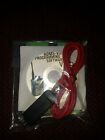
( Brand: Yaesu ), ( Manufacturer Part Number: ADMS-VX6-USB ), ( Part Type: Cable )
Review YAESU Software Cable
The ADMS-VX5-USB and ADMS-VX6-USB are high-quality software cables designed specifically for use with the YAESU VX-5 and VX-6 handheld radios, respectively. These cables allow for seamless communication between your radio and a computer, enabling you to take advantage of a variety of features and functions not available on the radio alone.
The ADMS-VX5-USB and ADMS-VX6-USB cables are built to last, featuring a robust and durable design that can withstand frequent use and the rigors of the outdoors. The cables are made of high-quality, flexible materials that ensure a secure and reliable connection between your radio and computer, reducing the risk of damage or interference.
The cables are also compatible with a wide range of popular radio programming software, including CHIRP, CAT command, and YAESU System Fusion, allowing you to customize and configure your radio to meet your specific needs and preferences. With these software cables, you can easily update your radio's firmware, program multiple memory channels, and even upload and download voice files.
In addition, the ADMS-VX5-USB and ADMS-VX6-USB cables are easy to use, with a simple plug-and-play design that requires no additional drivers or software. Simply connect the cable to your radio and computer, and you're ready to go. The cables also feature a USB 2.0 interface, ensuring fast and reliable data transfer speeds for optimal performance.
Overall, the ADMS-VX5-USB and ADMS-VX6-USB software cables are essential tools for any YAESU VX-5 or VX-6 radio user who wants to take full advantage of their radio's capabilities. With their durable construction, compatibility with popular software, and easy-to-use design, these cables are a must-have for anyone who wants to get the most out of their radio.
Pros of purchasing a ADMS-VX5-USB and ADMS-VX6-USB Yaesu software cables:1. Compatibility: These cables are specifically designed for the Yaesu VX-5 and VX-6 handheld radios, ensuring a secure and reliable connection.
2. Easy setup: The software cables can be easily connected to your computer, eliminating the need for additional adapters or converters.
3. Firmware updates: The cables allow you to update the firmware of your Yaesu VX-5 or VX-6 radio, ensuring that you have the latest features and bug fixes.
4. Backup and restore: You can use the cables to backup and restore your radio's settings, such as memories, CTCSS/DTCS tones, and other configurations.
5. Affordable: Compared to other options, the ADMS-VX5-USB and ADMS-VX6-USB cables are relatively affordable, making them a cost-effective solution for updating and backing up your Yaesu radios.
Cons of purchasing a ADMS-VX5-USB and ADMS-VX6-USB Yaesu software cables:1. Limited compatibility: These cables are only compatible with the Yaesu VX-5 and VX-6 handheld radios, so they may not be suitable for other Yaesu or third-party radio models.
2. Requires software: The cables require the use of Yaesu's CHIRP software or the Yaesu System Fusion Software to function, which may require additional setup and configuration.
3. Cable length: The cables are relatively short (approximately 1.5 meters), which may limit their use in some situations.
In conclusion, the ADMS-VX5-USB and ADMS-VX6-USB Yaesu software cables are a great option for Yaesu VX-5 and VX-6 radio users looking for an affordable and reliable way to update their firmware, backup and restore their settings, and perform other tasks. However, it's important to note that the cables only work with specific Yaesu radios and require additional software. If you have a different radio model, you may need to consider alternative options.
Recommendation: If you own a Yaesu VX-5 or VX-6 radio and are looking for a way to update your firmware, backup and restore your settings, or perform other tasks, the ADMS-VX5-USB and ADMS-VX6-USB Yaesu software cables are a great option to consider. They are affordable, easy to use, and provide a secure and reliable connection to your computer. Just make sure to check that your computer meets the system requirements for the required software before making a purchase.
Details:
Never used still in plastic.
part #: admsvx6 prices
- $40.00-$45.00
specifications hamamateuradio:
- brand: Yaesu
- mpn: Adms-vx6-usb
- part type: Cable
General hamamateuradio:
- in stock: Yes
- consumer electronics > radio communication electronics > ham amateur radio communication
- condition: Used
Shipping hamamateuradio:
- handling: days
- type: Calculated
- cost: $3.5
Returns hamamateuradio:
- policy: no returns
Ratings:
- graded VG but the Jacket has a tear in the bottom that was not listed. 03-02-18
- Arrived fast and record as described. 03-02-18
- Album arrived as described or better. Great packaging and fast shipping. A 03-02-18
- Good communication, made for an easy transaction. 03-03-18
- Great! Thanks! 03-05-18
Payments hamamateuradio:
- PayPal
Seller hamamateuradio:
- city: Shippensburg, Pennsylvania
- zipcode: 17257
Offer hamamateuradio:
- bids: 0
- quantity: 1
- min. bid: $15.00
- Started: March 6, 2018, 12:37 pm
- best offer: false
- Sold: 0
Yaesu ADMS-VX6 Is Similar To:
- 001650b Yaesu Part Reference Unit For (45.9% similar) Tested and works fine. Yaesu part 001650B reference unit for the FT-100 transceiver this is in good condition...(February 28th, 2017)
- 1fvs Yaesu Voice Synthesizer Unit For (45.9% similar) For FT-736R late model , FT-847, VR-5000 Yaesu radios. Yaesu FVS-1A voice synthesizer unit for FT-847 FT847 FT-736 FT736 VR-5000. E-mail for any questions. TN for your interest on this item...(November 18th, 2018)
- Radio Adms 2900r Cd Cable Yaesu Programming Transceiver Ft Box (28.3% similar) Four delectable power output levels are provided watts . I purchased this two months ago with my intentions of using it with my repeater for my business. You are buying on a new in the box Yaesu ft 2900R ft 2900R 75 watt heavy duty 144 MHz FM transceiver high power output with no cooling fan needed...(March 11th, 2015)
- 2sb-10b Yaesu Quiet Cooling Fan For Ee Ex Fe Fx Zd (41.4% similar) Part: 2SB-10B prices...(October 31st, 2018)
- 5399y Mfj Cable Pin Round To Modular Plug For Yaesu (27.3% similar) Mfg 5399Y cable for Yaesu...(July 2nd, 2018)
- 706c Inrad Intl Radio Ssb Filter Khz If For Yaesu Etc (24.4% similar) Used in several Yaesu and other rigs...(November 25th, 2018)
- 723175886322 Yaesu Rt Systems Programimg Software And Cable (45.8% similar) You use the CD serial number to download directly from rt systems web site. This is the complete package, serial number card, USBC-62 cable, and software. Version 5 gives you the option to download software computers that do not have a CD ROM drive. Rt systems Yaesu 817ND version 5 programming ...(July 15th, 2018)
- A6200b For Yaesu Ft Am Filter My Other Ham Radio Gear (33.3% similar) For fastest response see my about me page contact. Please examine the photographs as there are an important part of in every listing. Shipping costs quoted are for the lower 48 states only. Have some ham gear your not using. Contact me I will buy it fast...(October 24th, 2018)
- Ad-1-y8 Heil Sound Headset Adapter Cable Yaesu Round Used (38.3% similar) Used adapter from a silent key estate...(April 11th, 2018)
- Ad-100 Heil Sound Demultiplex Adapter For To Pin Yaesu Use With (26% similar) You are purchasing 1 new hail sound ad adapter cable, microphone cable to transceiver, 8-PIN round receptacle 6-PIN modular plug, free shipping note: Yaesu 8 pin male 6 used in conjunction with AD-1-Y, CC-1-Y, or CC-1-XLR-YB...(February 27th, 2018)
- Adms-2900 Yaesu Rt Systems Original 820103300001 (40% similar) The programmer has copy and paste of memory channel information between files. Rt systems programming software for windows PX, vista, and 64 bit, with the ADMS-2900 programmer you can begin a new factory fresh file into which frequencies and option settings are entered. Even from a different radio. ...(June 5th, 2017)
