RT SYSTEMS ADMS-7900 Yaesu Programming Software FT-7900
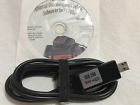
( Brand: Rt Systems ), ( Manufacturer Part Number: ADMS-7900 )
Review RT SYSTEMS Yaesu Programming Software
The ADMS-7900 Yaesu RT programming software is a powerful tool designed specifically for the Yaesu FT-7900 transceiver. This software allows for comprehensive and precise control over your FT-7900, offering a user-friendly interface that simplifies the programming process.
The ADMS-7900 software provides access to an extensive range of settings, allowing you to fully customize your FT-7900 to meet your specific needs. This includes adjusting transmit and receive frequencies, memory channels, CAT commands, and more. The software also supports various memory banks, allowing you to store and organize your settings for easy recall.
One of the standout features of the ADMS-7900 software is its ability to simulate the FT-7900's functions, allowing you to test and verify your programming changes before applying them to the actual radio. This feature can help prevent potential issues and ensure that your radio is functioning optimally.
The software is compatible with both Windows and Mac operating systems, and it requires a minimum system configuration to ensure smooth operation. The ADMS-7900 software is a must-have tool for any serious ham radio enthusiast who owns a Yaesu FT-7900 transceiver, providing an easy and efficient way to manage and customize your radio settings.
Pros of buying ADMS-7900 Yaesu RT programming software for FT-7900:1. Compatibility: The ADMS-7900 software is specifically designed for the Yaesu FT-7900 transceiver, ensuring a seamless integration and optimal performance.
2. Versatility: The software allows you to program various settings, such as frequencies, memories, squelch levels, and CAT functions, making it a convenient tool for managing your transceiver.
3. Efficiency: By using the software, you can easily backup and restore your transceiver's settings, reducing the risk of losing configurations and saving time in the process.
4. Customizability: The ADMS-7900 software provides options for customizing your radio's settings, such as creating custom memories, setting up CW macros, and configuring the display.
Cons of buying ADMS-7900 Yaesu RT programming software for FT-7900:1. Cost: The software may be expensive for some hobbyists, especially considering that some basic programming functions can be performed without it.
2. Learning curve: The software may have a steep learning curve for users who are not familiar with computer-based radio programming, which could be a barrier to entry for some.
3. Compatibility issues: While the software is designed for the FT-7900, there may be occasional compatibility issues with specific operating systems or versions of the software, which could require additional troubleshooting.
Conclusion:The ADMS-7900 Yaesu RT programming software for FT-7900 offers a range of features that can enhance the user's experience with the transceiver. However, the cost and learning curve may be a barrier for some hobbyists. If you are looking for a convenient and efficient way to manage your FT-7900's settings, and you are willing to invest the time and money, the ADMS-7900 software could be a worthwhile investment.
Recommendation:If you are a serious ham radio operator who uses the FT-7900 regularly and wants to make the most of its features, the ADMS-7900 software is a recommended purchase. However, if you are a casual user or are just starting out in ham radio, you may want to consider other options that are more cost-effective and user-friendly.
Details:
1 full version or windows 10. This is the best way to program radio. The programmer has copy and paste of memory channel information between files.
Its just easy. Column editing for changing several channels with minimal typing. Rt Systems ADMS-7900 programming software makes it easy to manage memory channel information and other menu settings of the yaesu ft free USPS shipping.
Software and programming cable. Rt Systems programming software for windows and 64 bit, 8. Spreadsheet layout with many point and options.
An easy interface to arr travel plus, finder-worldwide repeater directory, radio reference, or book get information. Read the current configuration from radio for editing or start scratch in a new file.
specifications hamamateuradio:
- brand: Rt Systems
- mpn: Adms-7900
Seller hamamateuradio:
- zipcode: 34761
- city: Ocoee, Florida
Shipping hamamateuradio:
- type: Flat
- cost: $0.0
- handling: 1 days
Ratings:
- Highly recommended 09-25-17
- Fast Ship, Exactly as described. Thanks ! 09-23-17
- Item as described and got it fast. 09-29-17
- Great to deal with, fast shipping, as described, would buy from again. 09-26-17
- Fast shipping, item in excellent condition, thanks! 09-25-17
Offer hamamateuradio:
- Sold: 0
- quantity: 1
- best offer: false
- bids: 0
- StaRted: September 30, 2017, 6:25 am
Payments hamamateuradio:
- PayPal
General hamamateuradio:
- condition: Used
- in stock: Yes
- consumer electronics > radio communication electronics > ham amateur radio communication
Returns hamamateuradio:
- policy: no returns
Rt Systems ADMS-7900 Is Similar To:
- 723175886322 Yaesu Rt Systems Programimg Software And Cable (45.4% similar) You use the CD serial number to download directly from Rt Systems web site. This is the complete package, serial number card, USBC-62 cable, and software. Version 5 gives you the option to download software computers that do not have a CD ROM drive. Rt Systems yaesu 817ND version 5 programming ...(July 15th, 2018)
- Adms-1j Rt Systems Programming Software (72.7% similar) Works with windows and 64 bit or 8 full version. Software: program memories and other setting of the yaesu FT-857 FT-897 radios. USB-62B cable: USB to 8-PIN mini din programming cat cable. The CD sleeve is still sealed. New Sand never used free shipping. This item was given to me but I have no use ...(February 15th, 2018)
- Adms-2900 Yaesu Rt Systems Original 820103300001 (55.8% similar) The programmer has copy and paste of memory channel information between files. Rt Systems programming software for windows PX, vista, and 64 bit, with the ADMS-2900 programmer you can begin a new factory fresh file into which frequencies and option settings are entered. Even from a different radio. ...(June 5th, 2017)
- Adms-2h-usb Rt Systems Programming Software Usb Cable For Yaesu (55.4% similar) USB-29B USB to 6-PIN mini-din programming cable. For sale is one brand new Rt Systems ADMS-2H-USB programming cable and software kit yaesu FT-8900 radios. So why battle with shill buyers and last second bid snipers when you can have this item at a fair price. Sales and shipping only to USPS us ...(May 20th, 2018)
- Adms-2j Rt Systems Adams 2j (58.5% similar) ...(May 10th, 2017)
- Adms-350 Rt Systems Yaesu Programming Software And Cable Usb (71.4% similar) Programming software and USB to program yaesu FTM-350 free USA shipping...(June 10th, 2018)
- Adms-ft2d-u Rt Systems Programming Software For Yaesu Not Included (53.8% similar) Offer is for software only cable not included CD in good condition...(November 19th, 2018)
- Adms-ft2d-usb Yaesu Rt Systems Original Usb Programming Software Version 702646179088 (50.4% similar) Column editing for changing several channels with minimal typing. An easy interface to arr travel plus, finder-worldwide repeater directory, radio reference, or book get information. Read the current configuration from radio for editing or start scratch in a new file. Works with windows PX, vista, ...(December 6th, 2018)
- Adms-m100 Rt Systems Programming Software Only For The Yaesu Free Ship (55.6% similar) Mint condition. Never used to program radio...(March 20th, 2019)
- Adms-vx8 Rt Systems Yaesu Vx-8dr 628586667884 (57.8% similar) Free shipping...(August 17th, 2017)
- Adms70 Rt Systems Fixedmount Cb Radios Programming Software Cable 723175887282 (55.2% similar) We reply every message within 48 hours. The programmer has copy paste of memory channel information between files. Rt Systems programming software works windows mac OS requires internet online for the initial download only, a CD is no longer included required. Read the current configuration from ...(September 25th, 2018)
